
Carrom is easy to start and hard to master: you flick a heavy disc, the striker, into lighter coins and try to send them into the four corner pockets. This guide walks through Carrom by 22Softwares one screen at a time: picking a game type, placing the striker, aiming and choosing power, cancelling a shot you do not like, and finding the right angle when the coin is not lined up with the pocket.
Every picture below is a real screenshot from the game. The gold numbered callouts, and the dashed diagram lines in the angle section, are drawn on top to explain what you see.
The home screen: choose a game type and who to play
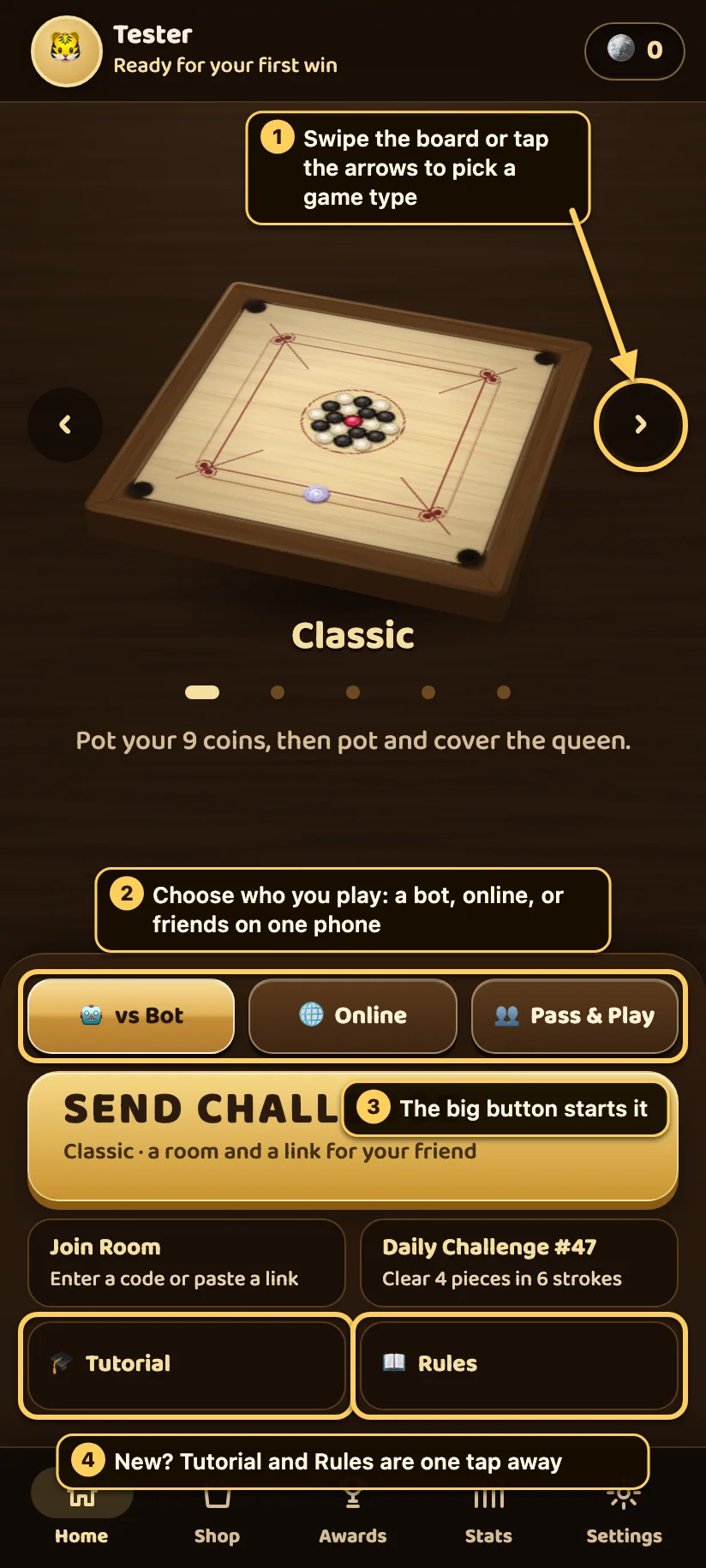
- Pick a game type. Swipe the board left or right, or tap the arrows beside it. The name and a one-line summary appear under the board.
- Choose who you play. vs Bot plays against computer opponents at four levels (Easy, Medium, Hard, Expert). Online plays real people, or a friend you invite to a room. Pass & Play is for two or four people sharing one phone.
- Start. The big button below starts the game you picked.
- New to carrom? The Tutorial walks you through your first strokes, and Rules explains every game type. You can also open the rules during a match from the pause menu.
The five game types
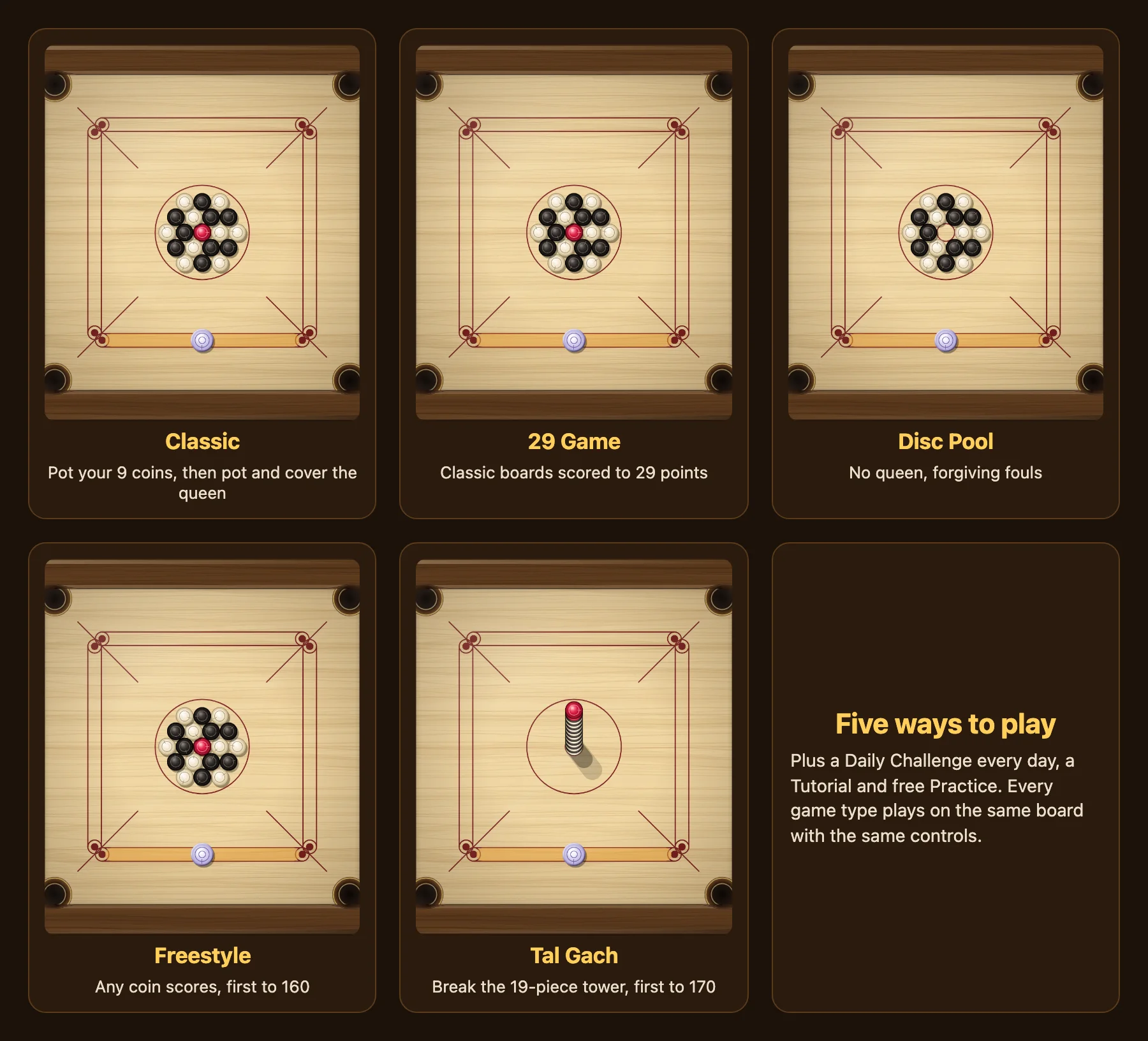
All five use the same board, the same striker and the same controls. What changes is the scoring.
- Classic. Player 1 pots the white coins, player 2 the black ones. Potting one of yours keeps your turn. The red queen must be pocketed and then covered: pot one of your own coins on your very next stroke, or the queen goes back to the centre. You win by potting all 9 of your coins once the queen is covered.
- 29 Game. Each board is played like Classic. The side that clears its coins scores a point for each of the opponents' coins still on the board, plus 5 for the queen if they covered it (only while they have 23 points or fewer). The first side to 29 points wins, so a game takes several boards.
- Disc Pool. No queen and forgiving fouls. Every disc counts for its owner, whoever pots it. The first side with all 9 discs down wins.
- Freestyle. Any coin scores for whoever pots it: white 20, black 10, and the queen 50 once it is covered. The first to 160 points wins.
- Tal Gach. All 19 pieces start stacked in one tower at the centre, with the queen on top. Your first stroke breaks it. Any piece scores the moment it drops: white 20, black 10, queen 50, with no cover needed. The first to 170 wins.
There is also a Daily Challenge: a new puzzle every day where you clear the board within a stroke limit (the number of pieces plus two), and free Practice.
Two things are true in every game type. The pockets are tight, so only coins fit and the striker can never drop into a pocket. And a coin must be slow enough to fall: hit straight into a pocket at full power, it can rattle back out.
Place the striker on your baseline
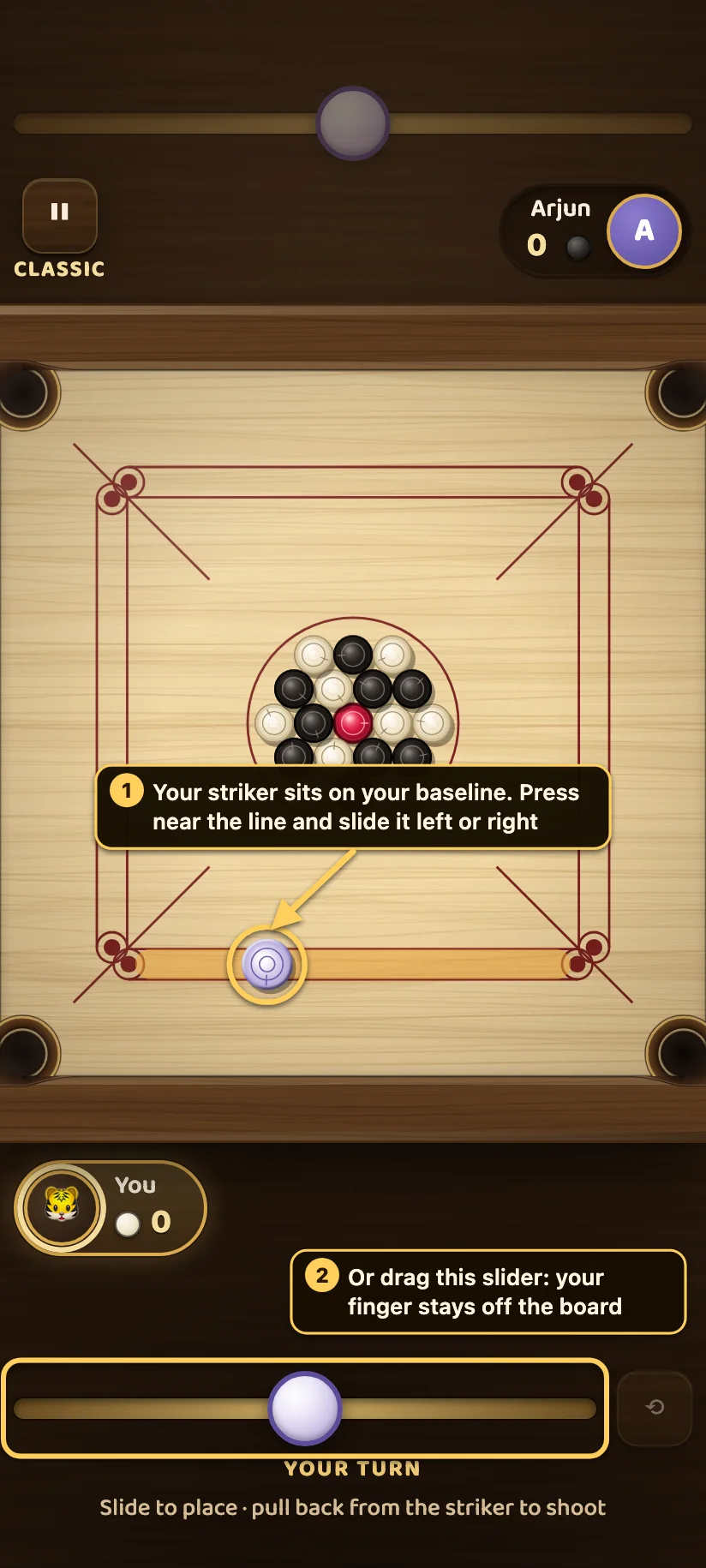
- Your striker always starts on your baseline, the long line nearest you. Press near the line and slide your finger left or right to move it.
- Or drag the slider under the board. It moves the striker the same way, and your finger stays off the board so you can see everything.
Where you put the striker matters as much as how you hit it. Before every stroke, slide it to the spot that gives you the cleanest line to the coin you want.
Aim and shoot: pull back like a slingshot
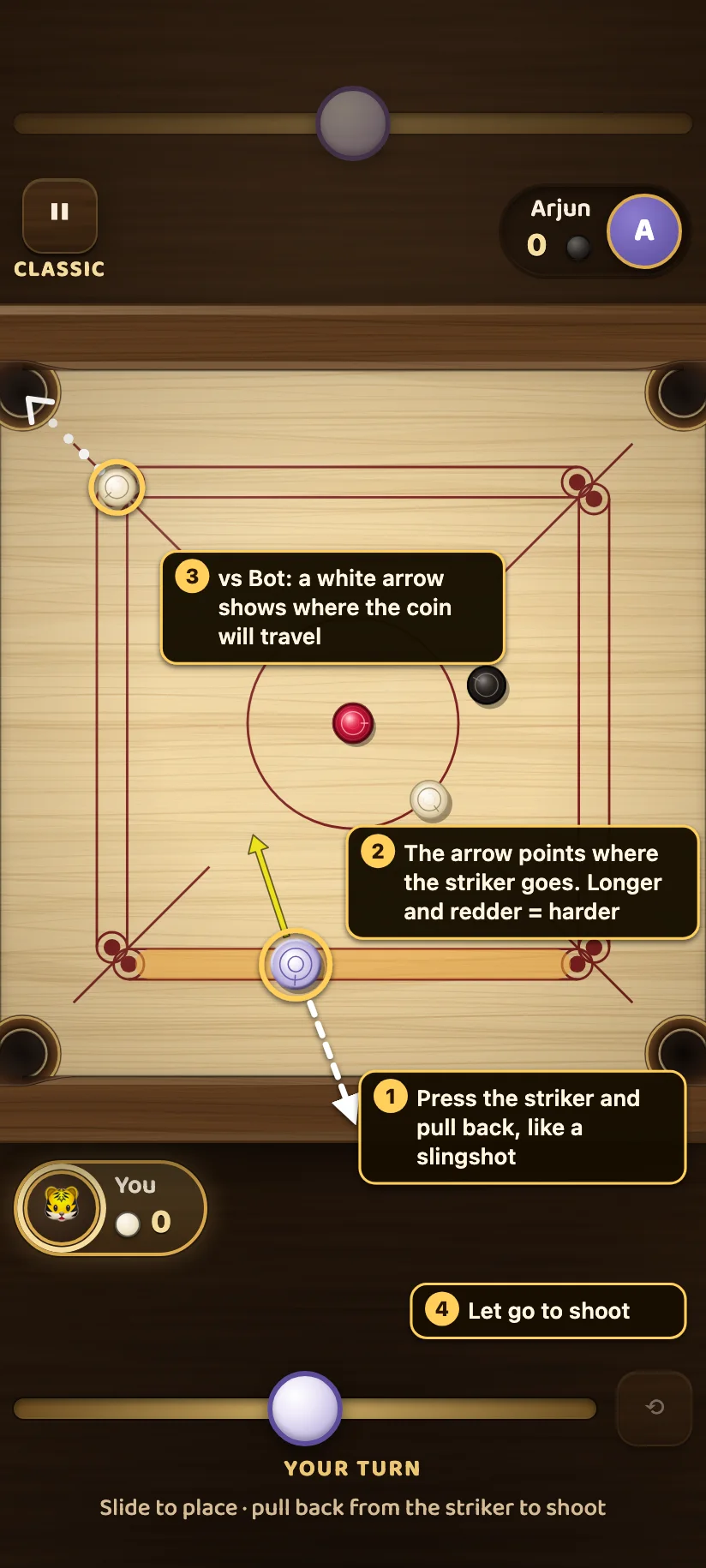
- Press the striker and pull back, away from where you want it to go, like a slingshot. You can pull in any direction, and your finger can leave the board.
- The power arrow comes out of the striker and points where it will go. The further you pull, the longer the arrow.
- In matches against a bot, a white arrow also starts at the coin your striker will hit and shows which way that coin will travel. Here it runs straight into the top-left pocket: a good shot.
- Let go to shoot.
If the white arrow misses the pocket, adjust your angle or move the striker before you let go.
How hard to hit
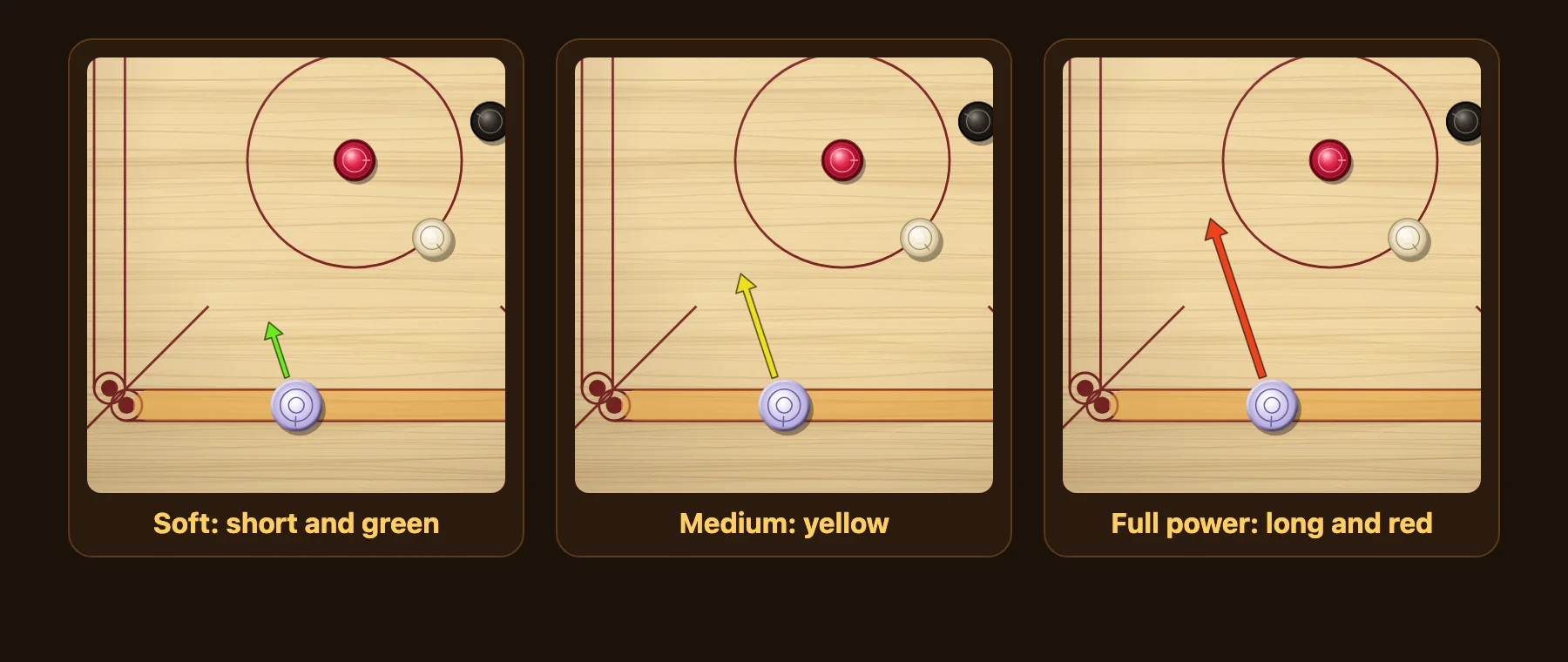
The arrow grows and changes colour as you pull: short and green is a soft touch, yellow is medium, long and red is full power.
More power is not always better. A coin hit straight into a pocket at full power can bounce back out, and a hard striker scatters the other coins. Use soft and medium strokes for coins near a pocket, and save full power for the break or long shots across the board.
Finding the angle: aim at the ghost spot
Most coins do not sit in a straight line between your striker and a pocket. For those cut shots, this method works every time:
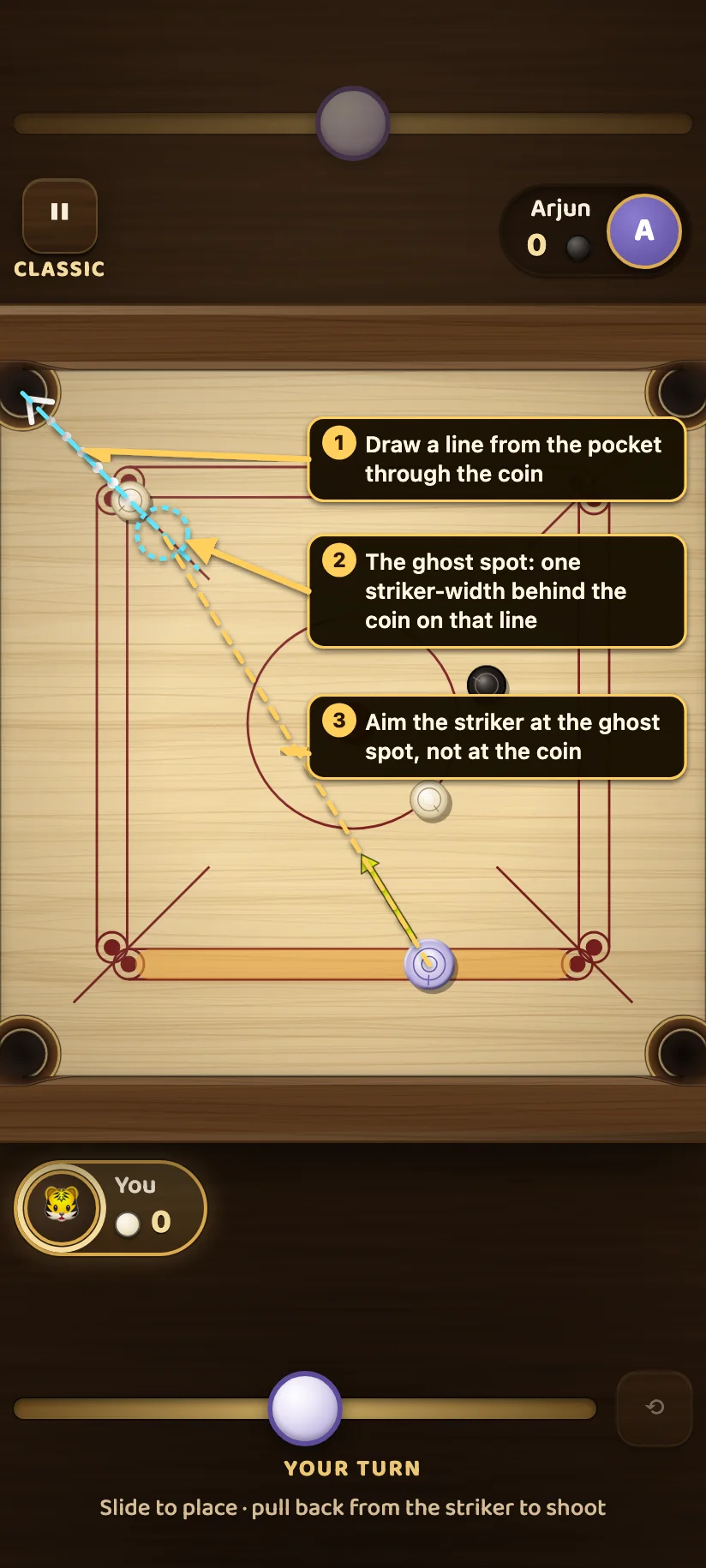
- Draw an imaginary line from the pocket through the coin, and carry it on past the coin.
- On that line, just behind the coin, is the ghost spot: the place the striker's centre must reach at the moment it touches the coin. A coin always moves away along the line through both centres, so a striker arriving there sends it along your line into the pocket.
- Aim the striker at the ghost spot, not at the coin. Aiming at the middle of the coin pushes it straight away from you, which is only right when the coin, the striker and the pocket are already in a line.
Two habits help:
- The thinner the cut, the softer the stroke. A coin clipped on its edge takes only a little of the striker's speed, so a thin cut needs more care with power than a straight shot.
- Slide the striker first. Often a few centimetres along the baseline turn a hard cut into an easy, nearly straight shot.
Coin in the way? Use the cushion
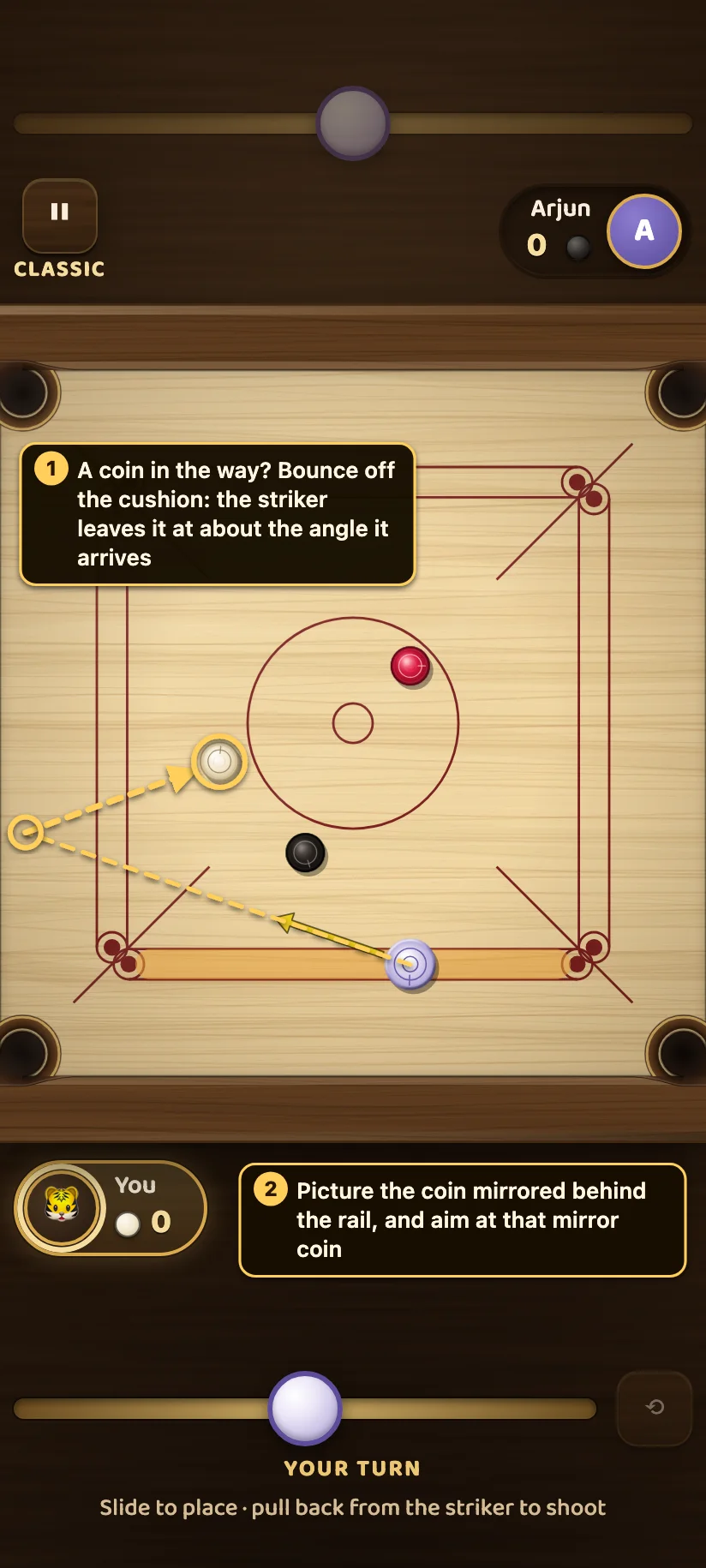
- When another coin blocks the direct line, bounce the striker off the cushion. It comes off at about the same angle it goes in.
- To find the spot on the rail, picture the target coin mirrored behind the rail, as if the cushion were a mirror, and aim at that mirror coin. The striker's path off the cushion then heads for the real coin.
Cushions take some speed off, so a bank shot needs a little more power than the same distance in a straight line. Treat the mirror as a starting point and adjust after watching where your first try goes.
Changed your mind? Cancel the shot
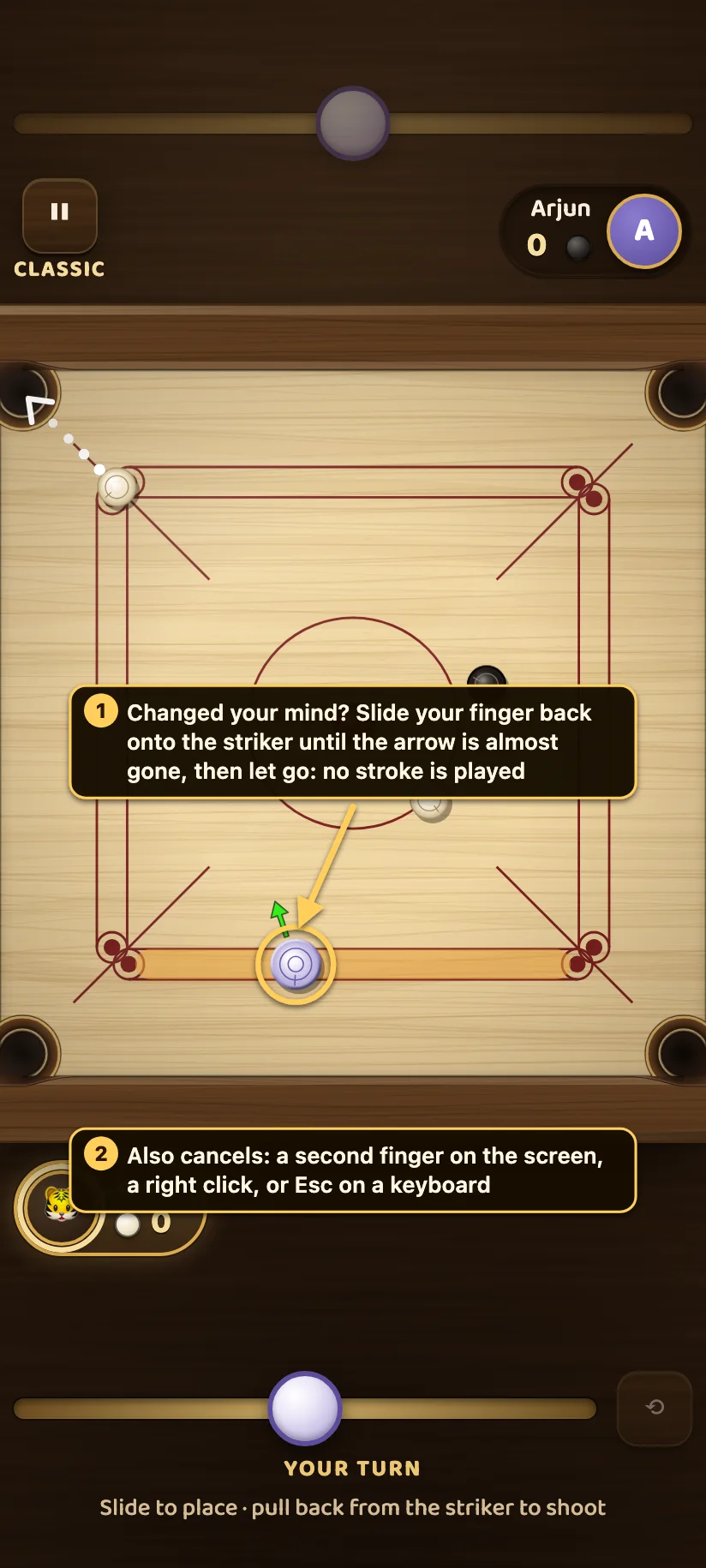
- Slide your finger back onto the striker until the arrow has almost disappeared, then let go. Below 5% power the game plays no stroke, and you can aim again.
- You can also cancel with a second finger on the screen, a right click with a mouse, or Esc on a keyboard. A phone call, a notification or switching apps also cancels the aim. A shot is only ever played when you let go yourself.
Tournament aiming
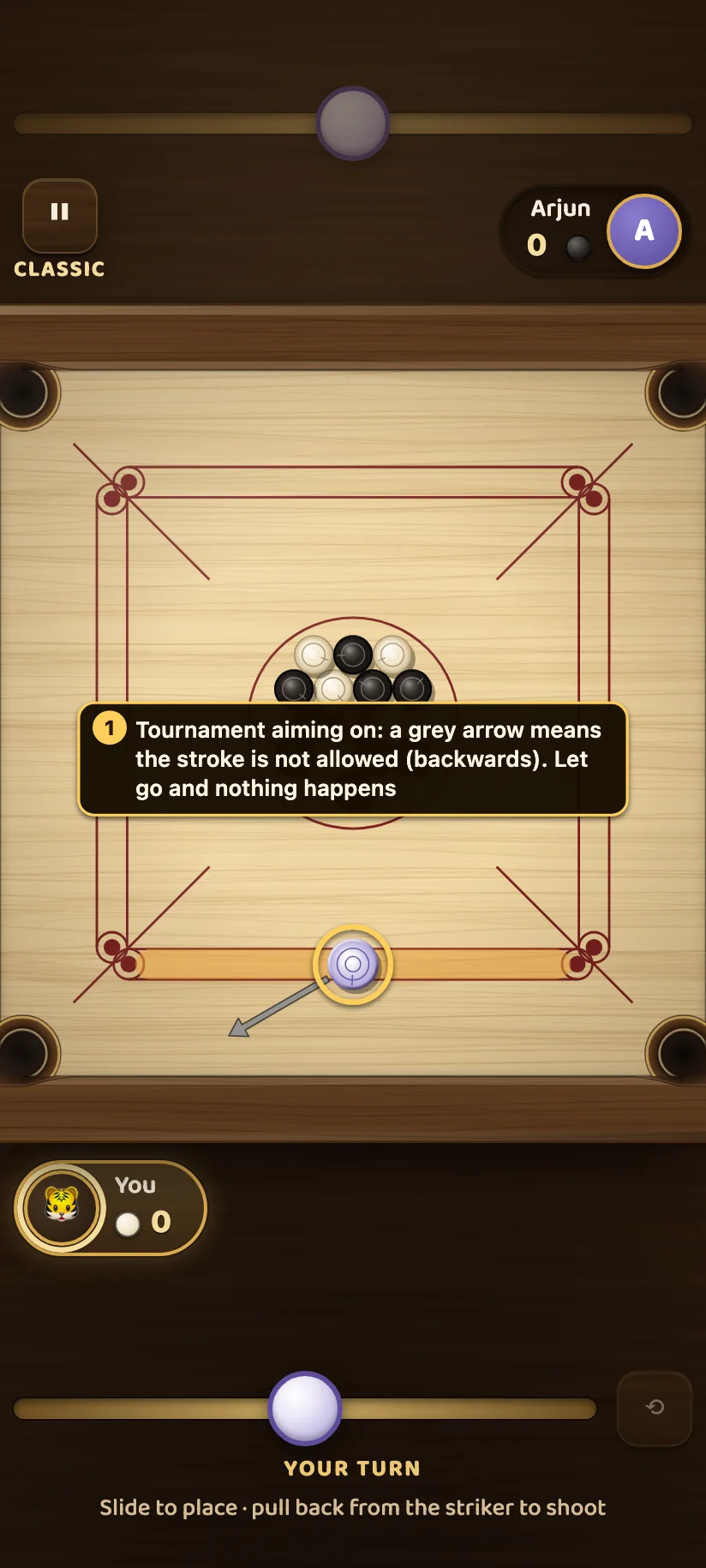
Competition carrom only allows forward strokes, away from your own baseline. Turn on Tournament aiming in Settings to play that way. With it on, a backwards aim turns the arrow grey: that stroke is not allowed, and letting go does nothing. Bots follow the same setting, so a tournament match is fair on both sides.
Settings that change how aiming looks
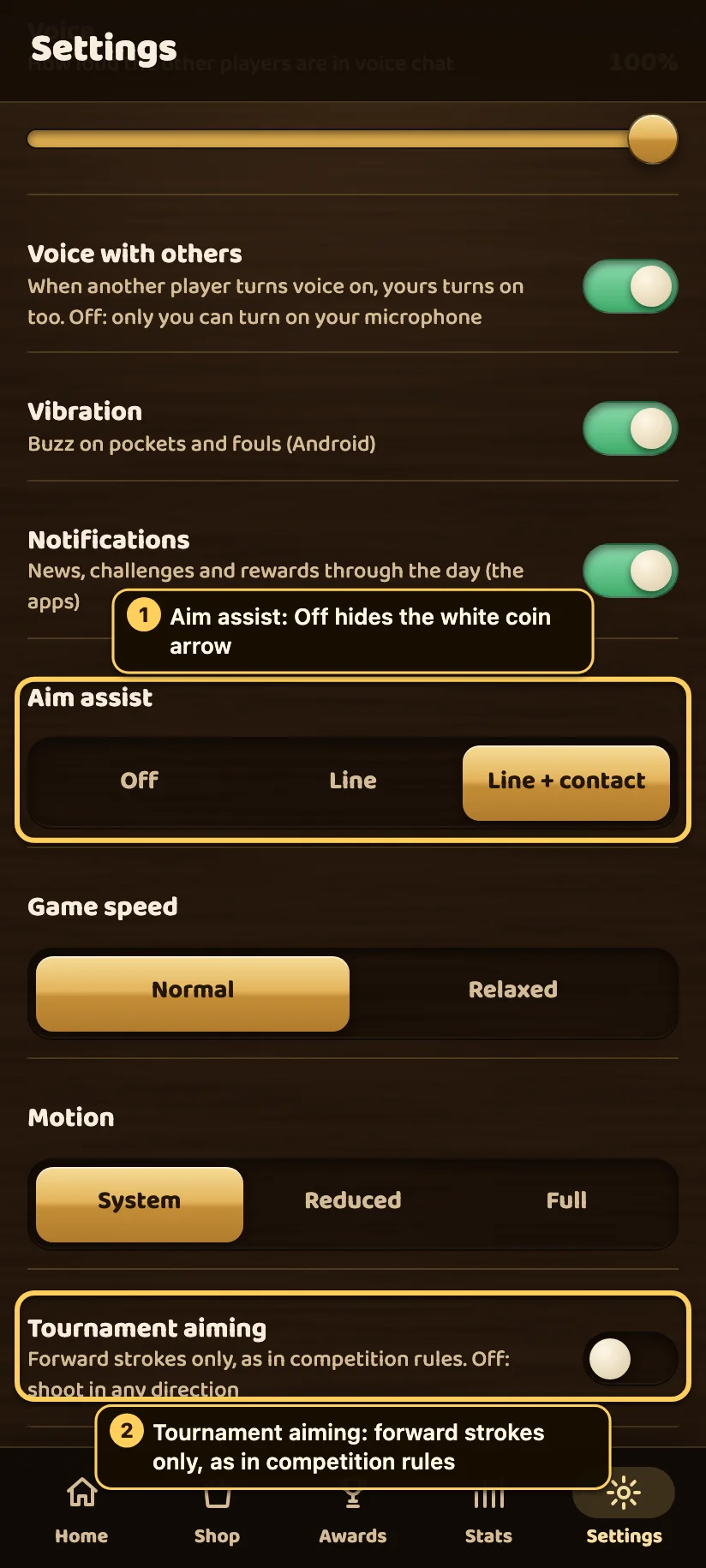
- Aim assist. With Off, the white arrow from the coin is hidden in bot matches, so you are aiming on your own judgement, as on a real board.
- Tournament aiming. Forward strokes only, as described above. It is off by default, so casual players can shoot in any direction.
Playing with a keyboard
On a computer you can play without the mouse: ← and → slide the striker (hold Shift for small steps), A and D turn the aim, hold Space to build up power and release to shoot, and Esc cancels the aim (or pauses when you are not aiming).
Quick checklist before every stroke
- Slide the striker to the spot with the cleanest line.
- Find the ghost spot: pocket, through the coin, and just beyond it.
- Pick the power: soft near pockets, harder only when you need the distance.
- Watch the power arrow, and the white coin arrow against a bot.
- Not happy? Slide back onto the striker and let go to cancel.
Practise these in a few games against an Easy bot, then move up to Medium: the habits you build there are the same ones that win online.
Controls and rules checked against the game’s code (input.ts, board-renderer.ts, variants.ts) by the Carrom by 22Softwares team. The gold numbered callouts and the dashed diagram lines in the angle pictures were drawn on top of real screenshots for this article.