
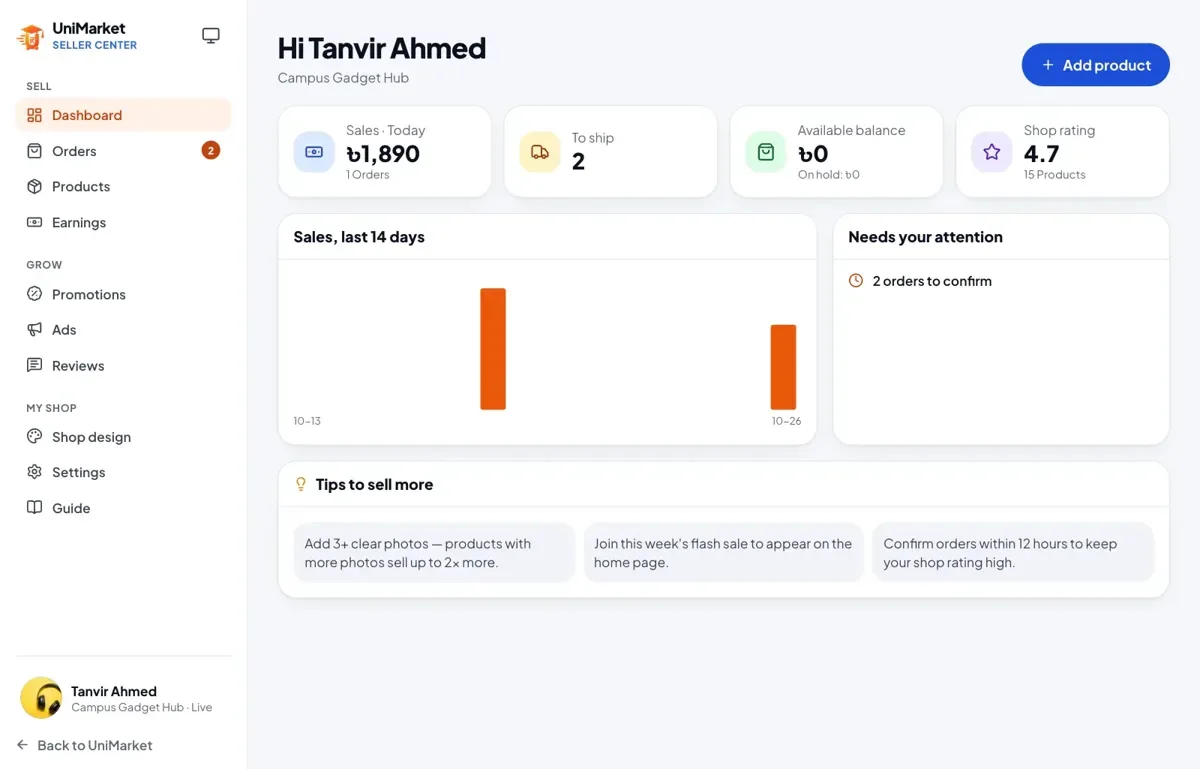
Every shop on UniMarket is run from the Seller Center. It is where you list products, handle orders, design your shop page, advertise and take your money out. This guide follows the order in which you will use it.
Apply and get approved
You sign in with your phone or email and apply for a shop: the shop name, a pickup address, identity documents for the check and the details where you want to be paid. The UniMarket team reviews the application, and the application page shows what is still missing. Documents are kept private and only the team can open them.
Add products, services and downloads
A shop can sell three kinds of things, and each one only asks for what it needs.
| Type | What you provide | Delivery charge |
|---|---|---|
| Physical product | Weight, stock, sizes and colours | Yes |
| Service | Where you work, how long it takes and what the buyer should send you | No |
| Digital download | The file or a link; buyers download it from their order | No |
Choose the category first, because it decides which options and specifications you fill in. Write the description in Bangla, English or both: the editor has headings, bold, bullet lists and note boxes. Submit the product for review. The team usually checks it within a day, and you can save a draft to finish later.
Handle an order
The Orders page lists every order for your shop with product photos. The tabs follow the order’s journey: to confirm, to pack, to ship, shipped and delivered. Open an order to move it forward one step at a time:
- Confirm the order after checking the items, quantities and options and, if you like, calling the buyer.
- Mark it Packed when it is ready.
- Mark it Shipped and add the courier and the tracking number.
- It becomes Delivered when the parcel reaches the buyer.
The buyer gets an email at every step. You can print an invoice and a shipping label from the order. Services and downloads skip the shipping step. If you cannot fulfil an order, cancel it with a reason, and the stock returns.
Make the shop yours
Under Shop design you can choose one of 10 themes and set your logo, banner and accent colour. The page builder lets you arrange your shop page as blocks: an announcement, a hero photo, featured products, a video, vouchers, reviews, a map and more. You can reorder, hide or delete blocks and watch a live preview before you publish.
The seller profile adds your photo, a short headline and bio in both languages, your social links, your WhatsApp number, your address and opening hours. Every shop also gets a QR code and a printable A4 flyer with your logo, your best products and the QR, handy for a stall or for a parcel.
Vouchers, campaigns and ads
- Shop vouchers: your shop pays the discount. Choose a code such as EID20, a percentage, a fixed amount or free delivery, a minimum order amount or number of items, and the products it applies to. Active vouchers show on your shop page and on the Offers page.
- Campaigns and flash sales: the team runs campaigns, and you join by choosing products and a campaign price. The team approves your entry, and running prices then show on product cards, product pages and at checkout.
- Sponsored products: you top up an ad wallet by bKash, Nagad or bank transfer, and the team verifies the payment. You then set a cost per click and a daily budget and pick the products. Ads appear in Sponsored picks on the home page and in search, marked as ads, and you pay only when a shopper clicks.
Earnings and withdrawals
Money from delivered orders, after the marketplace’s commission, first sits on hold during the return window, and then becomes available. The Earnings page lists every sale, commission and payout. You request a withdrawal to your bKash, Nagad, Rocket or bank account, and you get an email when it is paid.
The commission, the length of the return window and the minimum withdrawal are settings the marketplace owner chooses, so check the Earnings page of the shop you sell on.
Facts checked by the 22Softwares team against the live UniMarket app and its Seller Center guide.